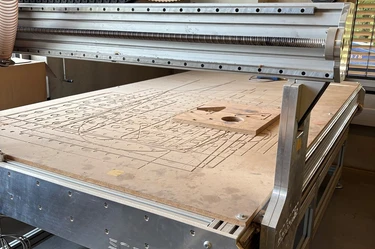
G-CNC-008E | CNC milling with the Sorotec (C)
Date
September 24, 2026 / 1:00 pm - 5:00 pm
Location / Venue
MakerSpace Garching
Lichtenbergstr. 6
85748 Garching bei München
Wood CNC Milling Made Easy!
This safety and fundamentals course teaches you the basics of CNC milling with the Sorotec Alu-Line. You'll learn how to create toolpaths from CAD data in Fusion 360, import them into Eding CNC, and run them safely on the Sorotec mill. As a hands-on exercise, you'll mill an engraved circular disc – the right starting point before you take on your own, larger projects.
Preparing for the course:
- basic knowledge of CNC milling, or an induction on the Hammer CNC, is helpful
- basic knowledge of Autodesk Fusion Manufacturing (CAM) is helpful – for example, through YouTube tutorials or Autodesk's training material
What you'll be able to do on our Sorotec after the CNC course:
- mill high-precision parts from wood or plastic
- create 2D and 2.5D shapes from your own CAD designs
- set up and measure up to four different tools on the tool changer
- prepare and simulate toolpaths and workpiece zero points safely
You can already download the Eding CNC control software to your own PC, try it out, and simulate toolpaths! More at https://edingcnc.com/download-software/
Learning objectives:
- Fusion: build an understanding of CAM setup
- use 2D adaptive clearing and 2D contour
- set up the post-processor and export G-code
- use and maintain the tool library in Fusion
- reference the axes and set workpiece zero points with a 3D probe
- clamp tool and material correctly
- check, simulate, and start the milling process
Deep dive: end mills and parameter selection
- get to know different end mill types (e.g., spiral-flute, profile, and specialty mills)
- set feed rate, spindle speed, and cutting depth correctly for clean cuts
- read chip shapes to optimize parameters (wood: crumbly chips, plastic: spiral chips)
- split milling passes into roughing and finishing for the best surface finish
Successful completion of this course is required before you can use the Sorotec Alu-Line independently in the MakerSpace.
Machine/Software
- CNC wood router Sorotec Alu‑Line
- Autodesk Fusion 360
- Eding CNC machine control software
Duration
4 hours
Minimum Age
- 16 years
- For teenagers aged 16 to 18, a parent or legal guardian must provide written consent.
Prerequisite
- English Language Skills
- Basic knowledge of CNC / CNC-005
- Basic knowledge of CAM
Safety Notice
Closed‑toe shoes must be worn at all times in the workshop. If this rule is not followed, access to the MakerSpace will be denied.
Booking information
- Changes and errors may occur.
- MakerSpace may cancel the course if there are not enough participants.
- Please take a moment to check your contact details so we can reach you if anything changes.