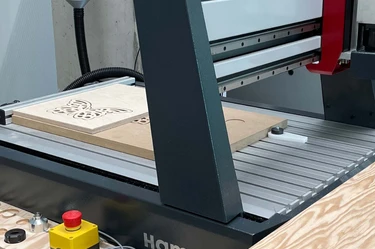
G-CNC-008E | CNC milling with the Sorotec (C)
Date
May 6, 2026 / 12:30 pm - 4:00 pm
Location / Venue
MakerSpace Garching
Lichtenbergstr. 6
85748 Garching bei München
CNC woodworking made wonderfully simple
In this safety and fundamentals course, you’ll learn the essential principles of CNC milling with the Sorotec Alu-Line. You’ll explore how to turn your CAD data from Fusion 360 into clean, reliable toolpaths, import them into Eding CNC, and run them safely and confidently on the Sorotec mill.
What you’ll be able to create on our Sorotec after completing the CNC course:
Mill high‑precision parts from wood or plastics with ease.
Bring your own CAD designs to life as clean 2D and 3D shapes.
Tackle more complex projects using different tools and workflows.
Prepare and simulate toolpaths and workpiece zero points with confidence.
You can also download the Eding CNC control software to your own computer ahead of time, explore its features, and even simulate toolpaths. More information is available at: [https://edingcnc.com/download-software/](https://edingcnc.com/download-software/)
Learning Goals:
- Fusion: Develop a clear understanding of the CAM setup
- Use 2D Adaptive Clearing and 2D Contour with confidence
- Set up the post‑processor and export clean G‑code
- Work with and maintain Fusion’s tool library
- Reference machine axes and set workpiece zero points using a 3D probe
- Secure tools and materials correctly
- Review, simulate, and launch your milling process with assurance
Mini‑module: Choosing the right end mill & machining parameters
- Get to know different types of end mills (e.g., spiral‑flute, profile, and specialty cutters)
- Set feed rate, spindle speed, and cutting depth for clean, reliable results
- Read chip patterns to fine‑tune your parameters (wood: crumbly chips, plastics: spiral chips)
- Split your machining process into roughing and finishing passes to achieve the best possible surface quality
Successful completion of this course is required before you can use the Sorotec Alu-Line independently in the MakerSpace.
It also serves as a prerequisite for the Felder H200 course.
Machine/Software
- CNC wood router Sorotec Alu‑Line
- Autodesk Fusion 360
- Eding CNC machine control software
Duration
3,5 hours
Minimum Age
- 16 years
- For teenagers aged 16 to 18, a parent or legal guardian must provide written consent.
Prerequisite
English Language Skills
Safety Notice
Closed‑toe shoes must be worn at all times in the workshop. If this rule is not followed, access to the MakerSpace will be denied.
Booking information
- Changes and errors may occur.
- MakerSpace may cancel the course if there are not enough participants.
- Please take a moment to check your contact details so we can reach you if anything changes.